Bulk Publish
One engineer and I cut publishing a 120-item course from 120 clicks to 2, in a hackathon week.
- Product
- Canvas LMS
- Role
- Senior Product Designer
- Team
- 1 engineer
- Timeline
- Hackathon week
- Year
- 2024
Summary
- Problem
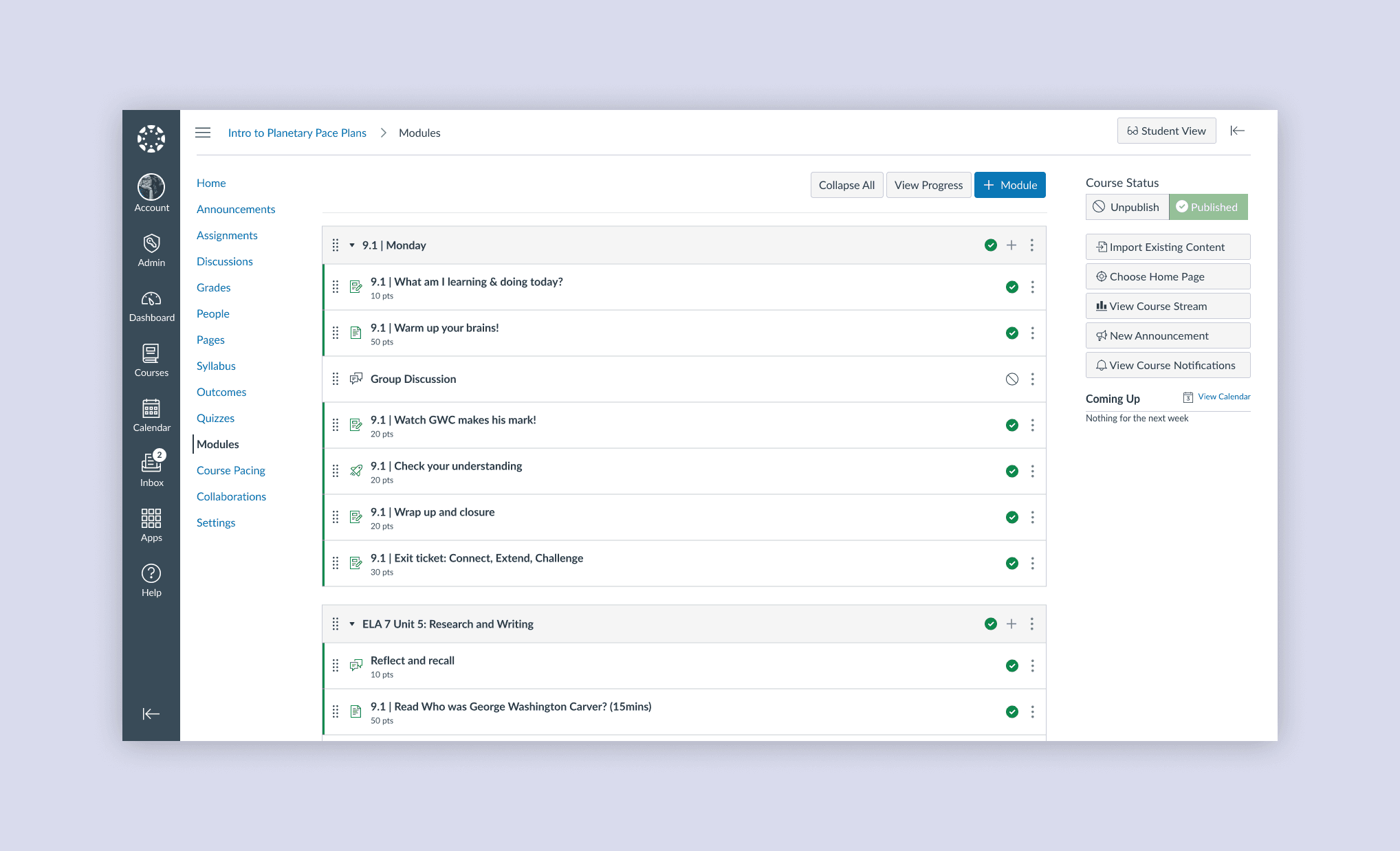
- Instructors could publish course items only one at a time. A semester course has 80 to 120.
- Solution
- Bulk publish actions for a whole course or module, with progress and error states.
- Result
- 120 clicks to 2. Released soon after.
The problem
Every module and item had its own publish button. That was the only way.
I picked it for the hackathon as a small change with a large usability gain.
It is quite a long list of assignments that I do not all want to be published when I publish the course.

I timed about four colleagues at 0.75 to 1 second per click, so a 120-item course takes 90 to 120 seconds before scrolling.

A menu, not multi-select
The usual pattern is a checkbox on every item plus an action menu. I dropped it, because instructors would still click every item and publish would sit where they didn't expect it. The engineer added that changing the list items was a much larger scope.

Instead, three actions work on the whole course or on one module.
- Publish all modules and items publishes everything.
- Publish all modules publishes the modules only, so students see the course outline before the assignments.
- Unpublish all unpublishes everything.


Designing for a background job
Publishing a large course runs in the background, so the design has a progress dialog and a completion alert.


With several editors in one course, I mapped what happens when:
- the browser tab is closed while the job is running;
- another editor opens the Modules page during the job, or already had it open;
- one editor cancels the job while another is watching its progress;
- two editors start the job at once;
- an item's content cannot be changed.

Outcome
- Clicks, 98% fewer
- 120 to 2
- Seconds, 95% less time
- 120 to 5
- Counted for: publishing every item in a 120-item course. The 120-second baseline is estimated from click time. The 5 seconds covers the two clicks, and the job then runs in the background.
- Not covered: a hand-picked set of items. Those are still published one at a time.
- Delivery: product leadership released it quickly, as high impact for little effort.
- Not measured: usage. I would compare bulk actions against single-item publishing.
Great improvement! Love it. Sometimes you want to bring in content from somewhere else, but might not want the whole module published.